
Intro to Process Automation (Part 4) - Integrating External Systems
Connectors vs. Workers And When to Use Which


Once a process model has been deployed, it usually needs to interact with other systems. A vacation request does not only exist inside the engine; it might need to send an email, update a record in the HR system, or fetch data from a calendar. In Camunda 8, these interactions are handled either through workers or through connectors. Both approaches let the process engine delegate work to external components, but they differ in complexity, flexibility, and the amount of technical effort required.
Workers: Technical but Flexible
Workers are the most fundamental way to connect Camunda to the outside world. A worker is a program that subscribes to a task type in Zeebe. When the engine reaches a service task of that type, it creates a job that the worker can fetch through the gRPC API. The job contains the relevant process variables, and the worker executes the logic before reporting the result back to Zeebe.
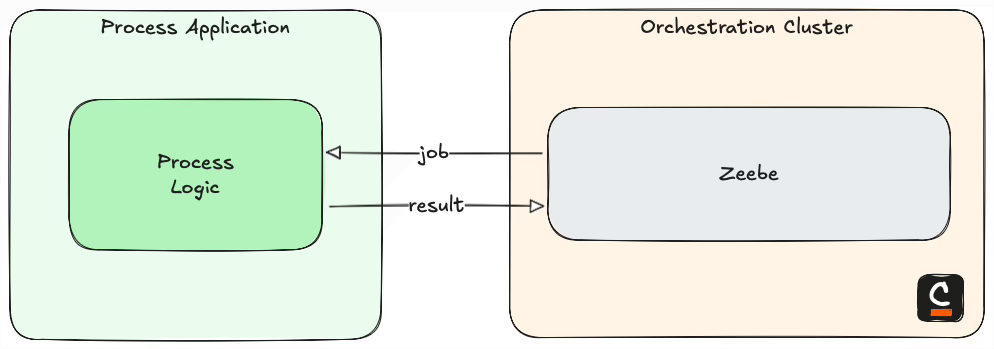
Because workers are implemented in code, they are very flexible. A worker can be written in languages like Java, Go, or Node.js and can perform any logic that the programming environment allows. In practice, Java has become the de facto standard for building workers. The ecosystem around Java, Spring, and Spring Boot provides excellent library support, dependency management, and production-ready patterns. This makes it easier to build robust integrations that connect to databases, APIs, or enterprise systems. For example, in the vacation request process, a Java Spring Boot worker could connect to the HR system’s API, validate vacation balances, and update employee records in a few lines of code using standard libraries.
The downside of workers is that they require development effort, deployment of a service, and lifecycle management for that service. This is why they are typically chosen in environments with dedicated IT teams, strong development practices, and complex integration requirements.
Connectors: Prebuilt and Easy to Use
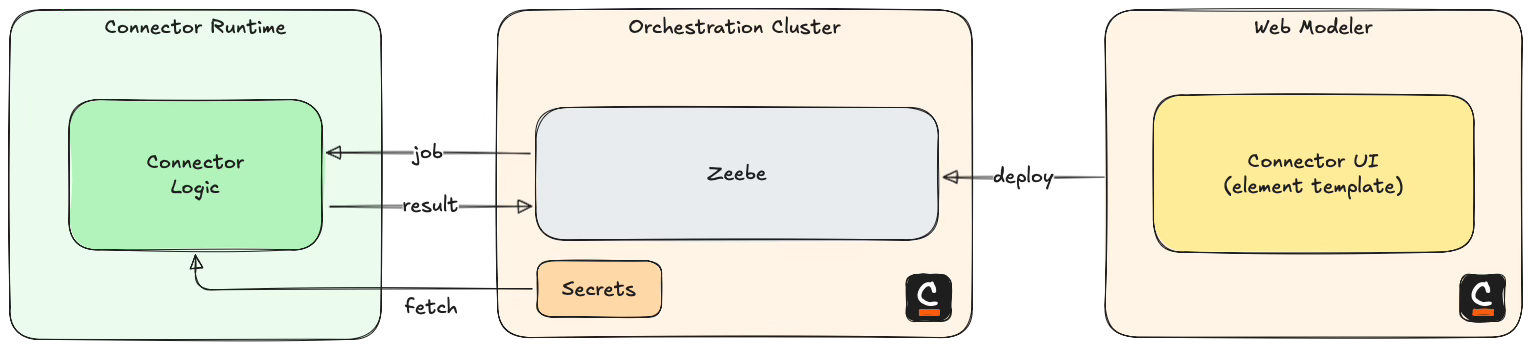
Connectors were introduced in Camunda 8 to simplify common integrations. A connector is essentially a prebuilt worker packaged with configuration options that can be set directly in the BPMN modeler. This means process designers can configure integrations without writing code. Connectors come in different forms, each suited to specific scenarios.
Protocol Connectors
Protocol connectors allow processes to interact with external systems over standard protocols. The most widely used example is the REST connector. With it, a process can call any REST API by configuring the endpoint, HTTP method, authentication, and payload. In the vacation request example, the REST connector could be used to call an internal HR API to check vacation balances or to update employee records once a request is approved.
Connector Templates
Connector templates build on top of the protocol connectors but simplify their configuration for recurring use cases. A template defines the request structure and parameters for a specific API, so process designers only need to fill in the variable values. For example, a company might create a connector template for their HR system’s REST API. Instead of configuring the full HTTP request every time, the template provides fields like “employee ID” and “vacation dates,” making integration straightforward for business users.
Other Connectors
Beyond protocol-based communication, Camunda provides connectors for specific technologies and platforms. These include messaging systems such as Kafka, email services for sending notifications, and cloud storage platforms like AWS S3. These are available out of the box and run within the Camunda Connector Runtime. They can be configured directly in the modeler, which makes them quick to set up for common integration scenarios. For example, the vacation request process might use the Mail connector to notify employees about approval decisions or the Kafka connector to publish an event that other services subscribe to.
Custom Connectors and the SDK
In addition to the out-of-the-box options, organizations can develop their own connectors when specific integrations are required. These custom connectors are implemented using the Connector SDK and must be hosted externally, usually as containerized services in the organization’s infrastructure. They behave like packaged workers, but once registered, they appear in the modeler like any standard connector. This hybrid approach allows teams to benefit from the ease of connectors for common scenarios while retaining the flexibility to extend the platform with company-specific integrations.
A custom connector is still a worker under the hood, but it is wrapped with metadata that makes it usable in a low-code way. This means business analysts or process designers can configure it in BPMN without needing to understand the implementation details. For example, if your organization uses a custom HR system that has no standard connector, you can build one with the SDK and make it available as easily as the built-in connectors.
When to Use Which
Workers and connectors both solve the problem of integrating processes with external systems, but the right choice depends on context, resources, and goals. Workers are the most flexible option.
If you are running large IT projects, have a team of developers, and sufficient budget, building custom workers or even custom connectors is often the best approach. This is the pro-code path. It allows full control, complex business logic, and integration with any system regardless of how unusual its API might be. For critical core processes, this level of reliability and customization is often worth the investment.
If your processes are less complex or less business-critical, or if you have a smaller IT team, low-code solutions are often more efficient. Connector templates are a good balance here. They standardize recurring API calls while making them easy for process designers to configure in the modeler. Protocol connectors like REST also fit into this category. They require some technical understanding of API calls but eliminate the need to maintain custom worker code. For many mid-sized organizations, this is the sweet spot that keeps projects moving without overloading developers.
Finally, there are scenarios where IT resources are very limited or even nonexistent. In such cases, out-of-the-box connectors become the primary tool. These connectors cover common needs such as sending emails, posting to Slack, or uploading to cloud storage. They allow business analysts or process owners to automate basic workflows without depending on development teams. While this approach comes with limitations in flexibility, it makes process automation accessible in environments where pro-code solutions are not feasible.
Looking Ahead
At this point, we have seen how processes can interact with external systems using workers and connectors. In the next part of the series, we will shift our focus from execution to monitoring. We will look at Operate, Camunda’s tool for observing running process instances, and see how it provides visibility into the state of workflows.