
Keeping Secrets–How to Handle Authentication Data in Low- and Pro-Code Environments
A Practical Guide to Secure Secret Handling in Camunda


Rriiing… Rriiiing!!! It’s 2 a.m., and you’re the unlucky developer on-call. An urgent alert pops up — your team’s automated workflow just failed because the external service it calls is rejecting all authentication attempts. A code review reveals the culprit: credentials were accidentally committed to a public Git repository weeks ago. By the time you discover the mistake, malicious actors have already hijacked the API key and locked you out. Now you’re facing downtime, escalating costs, and the embarrassment of scrambling to fix a breach that could’ve been prevented with a little foresight.
Why Secret Management Matters
Unfortunately, scenarios like this aren’t rare. According to IBM’s 2024 Cost of a Data Breach Report, stolen credentials remain a leading cause of incidents, averaging USD 4.81 million per breach and taking nearly 300 days to identify and contain. With numbers like that, you can’t afford to overlook secret management — especially when process automation platforms like Camunda bring multiple integrations and authentication points under one roof.
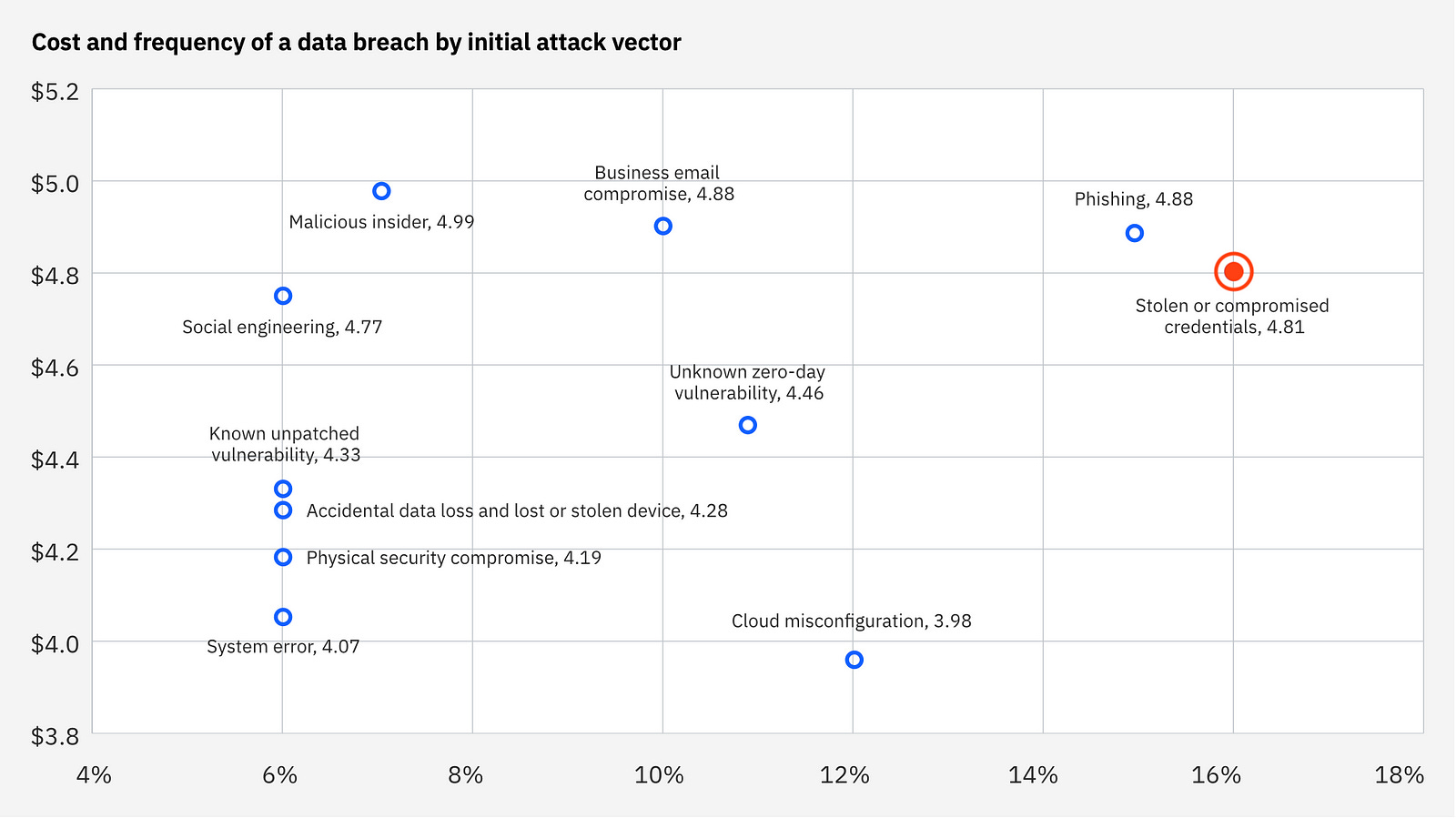
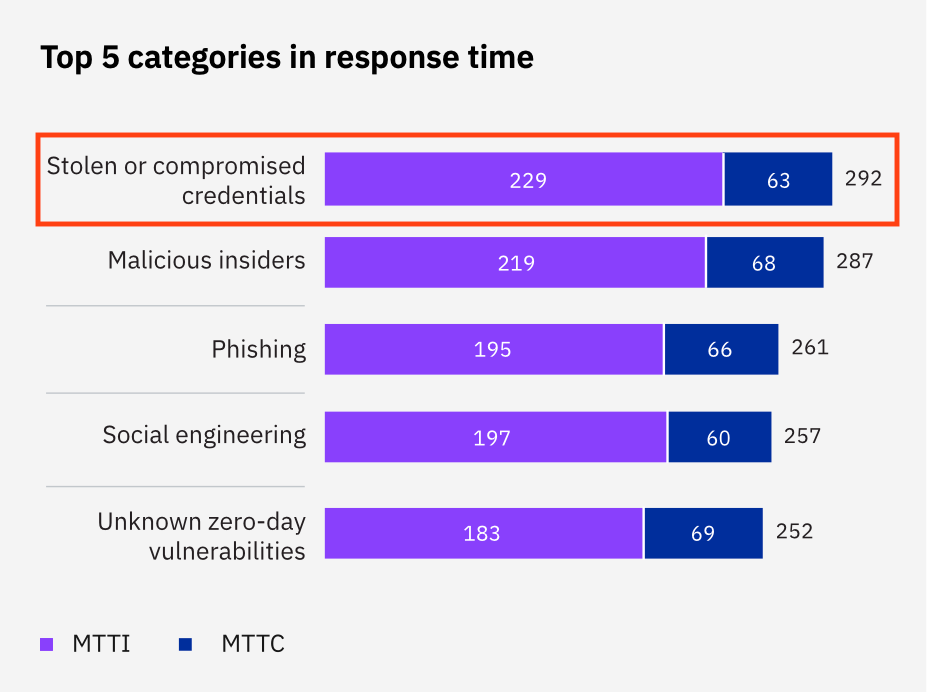
In this post, we’ll explore practical ways to manage secrets securely so you can keep your workflows running without handing the keys to your kingdom over to attackers.
Let’s Start From the Beginning
At some point, every developer faces the challenge of integrating with an external system, usually via an API. Ideally, that API is protected with an authentication mechanism, like a username and password, token, or key.
public RequestResult call(String endpoint) {
  String username = "max.power";
  String password = "p4ssw0rd!";
  Credentials credentials = new Credentials(username, password);
  return client.get(endpoint, credentials);
}
Easy? Yes. Secure? Absolutely not. Please don’t do this. If anyone gets access to your code repository (or desk), they also get access to your credentials.
What’s more, hardcoding credentials creates headaches:
Secrets get scattered across your systems.
Updates require manual changes everywhere they’re used.
Logs, backups, or debugging tools might expose them.
The solution? Active secret management.
Why Active Secret Management is Better
Centralizing your secrets (using tools like HashiCorp Vault or cloud-native secret stores) ensures they’re actively managed, stored securely and accessed appropriately. Here’s why it’s worth the effort:
Centralized control: No more secrets hiding in random corners of your codebase.
Encryption: Secrets are stored securely, not in plain text.
Access control: Only authorized users and systems can access them.
Traceability: Changes are logged and versioned, so you know who did what and when.
Backups: No risk of losing a critical secret.
Rotation: Secrets can be updated regularly to prevent misuse.
By adopting these practices, you’ll sleep better knowing your authentication data isn’t at risk.
Accessing Your Secrets
Once your secrets are locked up in a secure vault, how do your applications use them? Here are two common approaches:
Load Secrets at Startup
In this method, your application retrieves the secrets during initialization and keeps them in memory for its lifetime. The source of the secrets can be any kind of secret provider.
# start app with credentials as env variables
java -jar my-app.jar -DCLIENT_USER=XXX -DCLIENT_PASS=XXX
void init() {
this.username = System.getenv("CLIENT_USER");
this.password = System.getenv("CLIENT_PASS");
}
RequestResult call(String endpoint) {
var credentials = new Credentials(this.username, this.password);
return client.get(endpoint, credentials);
}✅ Pros: Low latency for API calls since secrets are preloaded.
❌ Cons: If a secret changes, you need to restart the application to reload it.
Dynamic Secret Retrieval
Here, secrets are fetched from the vault whenever needed:
public RequestResult callByUser(String key) {
  String token = secretStore.getToken(key);
  Client client = Client.builder().auth(token).build();
  return client.getReport();
}
✅ Pros: Always uses the latest version of the secret.
❌ Cons: Adds latency to API calls and depends on the vault being available.
Secure Secret Handling in Camunda
The Camunda engine doesn’t handle secrets directly, and that’s a good thing! The process engine is for managing workflows, not secrets. Exposing secrets in process variables can lead to them being logged, backed up, or worse.
Here’s how to handle secrets securely in both Pro-Code and Low-Code Camunda setups:
Pro-Code Job Workers
In a Pro-Code approach with Camunda, you’d typically implement one of the mechanisms described earlier — or even a more advanced solution — to handle credential retrieval for authorization. A job worker is essentially a Java application that uses REST to communicate with the process engine, execute business logic, and manage authorization for external systems.
The Spring framework provides a set of tools for this purpose, tailored to various tech stacks:
Spring Boot Configuration Properties for managing app configurations.
Spring Boot OAuth2 Starter for handling OAuth2-based authentication.
Spring Cloud Vault for accessing secrets stored in HashiCorp Vault.
Spring Cloud Config, which can use backends like AWS Secrets Manager.
Spring Cloud Azure, for accessing Azure Vault Secrets.
Spring Cloud Kubernetes for accessing Kubernetes Secrets.
These libraries offer flexibility based on your specific cloud or application environment, and there are many others available in and beyond the Spring ecosystem.
Since existing solutions already address secret handling effectively, Camunda doesn’t include this functionality for job workers. This makes sense, as it allows Camunda to focus on its core capabilities while leaving secret management to dedicated providers.
Low-Code Connectors
When working with Low-Code solutions, the approach to secret handling shifts slightly. Here, the goal is to use connectors to integrate with third-party systems without writing code.
Default Secret Provider — Camunda provides a straightforward way to manage connector secrets via a basic module. You can add secrets to the cluster through the Camunda console, making them accessible to all connectors in the Connector Runtime. These secrets are referenced in the Modeler’s configuration pane for the Connector, using a simple placeholder containing the name of the secret:

During runtime, the Connector Runtime (not the engine) replaces the placeholder with the actual secret value, providing it to the connector’s logic. This ensures that the secret remains hidden from the process engine, which only knows the placeholder — not the sensitive data itself.
Custom Secret Provider — If the default solution doesn’t meet your needs, you can implement a custom secret provider and integrate it into your own Connector Runtime. However, this shifts the approach towards Pro-Code, as it requires more engineering effort:
public class MySecretProvider implements SecretProvider {

  private final SecretService service;

  @Nullable
  public String getSecret(String key) {
    return service.getSecret(key);
  }
}
Your custom secret provider must implement an interface with a method to retrieve secrets based on a key. The returned value is the secret or null if it doesn’t exist.
Camunda doesn’t provide built-in caching or other management functions for custom providers, so it’s up to the engineer or architect to ensure the implementation aligns with the system’s architecture.
One advantage of using a separate service for secrets is its versatility. Decoupling the secret provider from the Connector Runtime allows the same service to be reused by job workers, streamlining secret management across your stack.
Connector Authentication Without Secret Providers
The previously mentioned approaches rely on using placeholders in the connector configuration, which are then replaced by the Connector Runtime through a secret provider. However, there are alternative methods that don’t involve placeholders.
Connector Token Retrieval — Sometimes, you need to fetch a one-time authentication token from a REST endpoint and use it in subsequent API calls. This approach is helpful when no dedicated connector is available to handle authentication. In such cases, you can leverage Camunda’s REST Connector to retrieve the token from the authorization endpoint. The token can then be stored as a process variable for use in later steps.
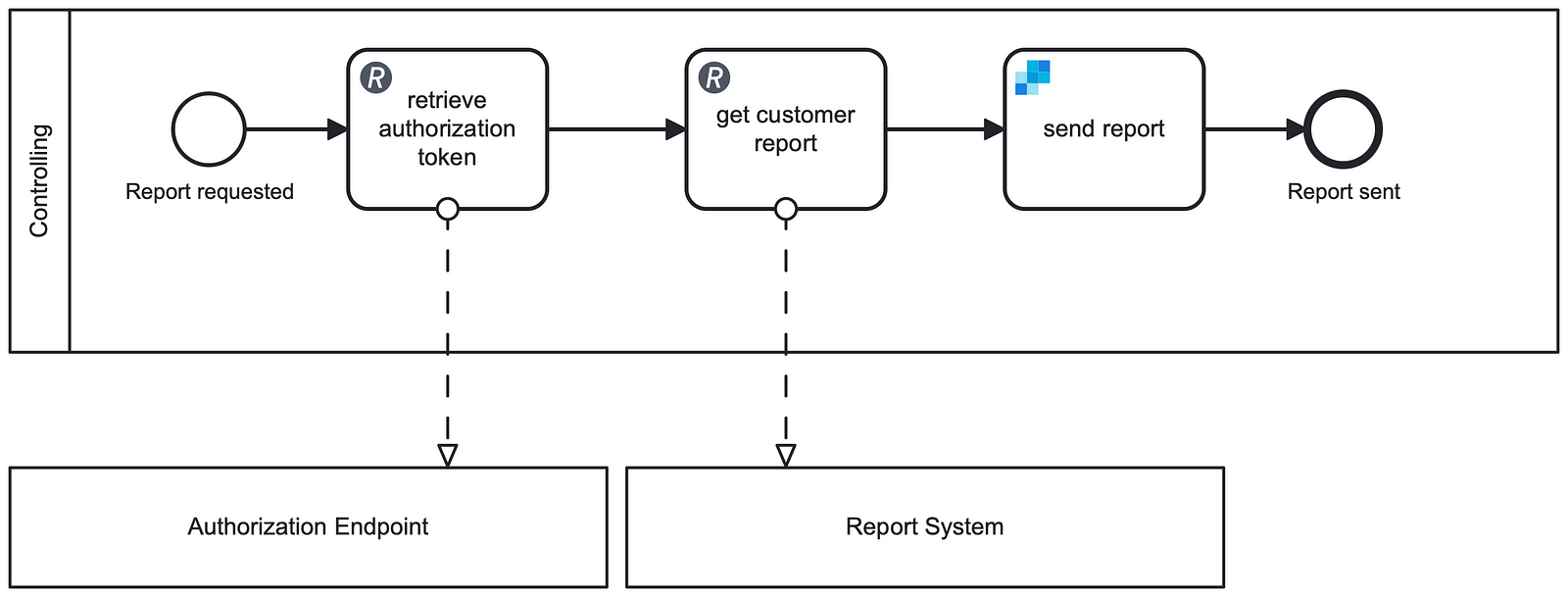
This method works best for tokens that either expire quickly or are valid for a single use. It ensures that the only an expired or invalid token is exposed within the process engine.
Code Token Retrieval — Some connectors are designed to handle authentication internally by retrieving temporary credentials programmatically. For these connectors, you typically configure resources like a role or client identifier. The connector then uses these details to obtain a token from the appropriate endpoint, which is used for subsequent API calls:
public Result doCall(String clientId) {
  var credentials = authClient.getAuthToken(clientId);
  return client.get(endpoint, credentials);
}
Unlike the REST Connector approach, this process doesn’t require explicit modeling in the BPMN diagram. The temporary token is managed entirely within the connector’s code, keeping it outside the process engine and maintaining a clear separation between business logic and technical details.
Some Thoughts About Caching
Caching secrets can boost performance by reducing the need to retrieve them from the secret provider with every API call. However, it comes with some important considerations:
Consistency: If secrets change, the cached version could become outdated, leading to authentication errors. To address this, you can implement expiration mechanisms or set up automatic refresh intervals to ensure secrets are kept up to date.
Security: When dealing with cached secrets, encryption is essential to protect them from unauthorized access. Many frameworks, like Spring, offer built-in tools to help with secure caching, ensuring that cached secrets are encrypted at rest and during transport. This adds an extra layer of security but also introduces the overhead of managing both the cache and encryption.
Auditability: This is key to maintaining control over cached secrets. Keeping detailed logs of cache access and modifications helps identify unauthorized actions or potential misuse. Regular monitoring ensures your secrets remain secure and your caching system is working as intended.
Scalability: When caching secrets, scalability is crucial to ensure your application performs well under heavy loads. Use distributed caching solutions to manage secrets across multiple nodes in larger systems. This prevents single points of failure and keeps the cache accessible, even as your application grows.
Fallback: No system is perfect, and distributed caches can fail. Having fallback strategies ensures your application can recover when the cache or secret provider is unavailable. This might mean fetching secrets directly from the provider as a backup or queuing requests until the cache is restored.
NOTE: Not all of these practices are absolutely necessary, but they should be considered based on your application’s needs and the level of security and scalability required. Caching can improve performance, but balancing it with scalability, security and consistency is key. Choosing the right frameworks and deciding what to implement based on your architecture will help simplify the process without overcomplicating things.
Bringing it all Together
Now that we know the most common scenarios, we can summarize them in the following big picture, that depicts all the shown approaches. Imagine a process application that uses all the mentioned approaches. It uses
the default secret provider to get secrets from the Camunda cluster
an OOTB REST Connector to get a one-time token
a connector with a custom secret provider
a connector that handles the secret retrieval themselves
a job worker that handles secrets on its own
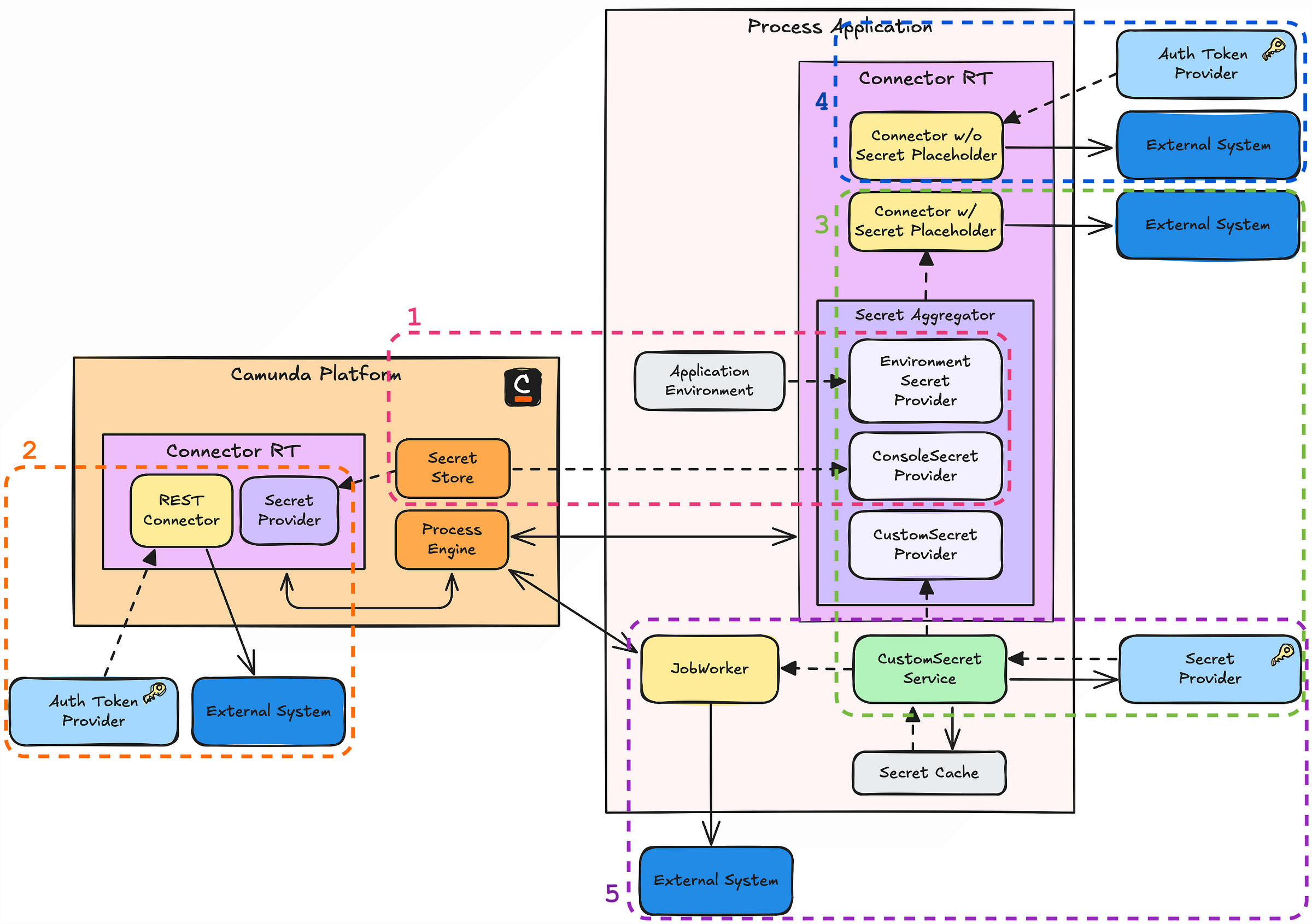
The following list summarizes these approaches from most Low-Code to most Pro-Code approach for retrieving secrets:
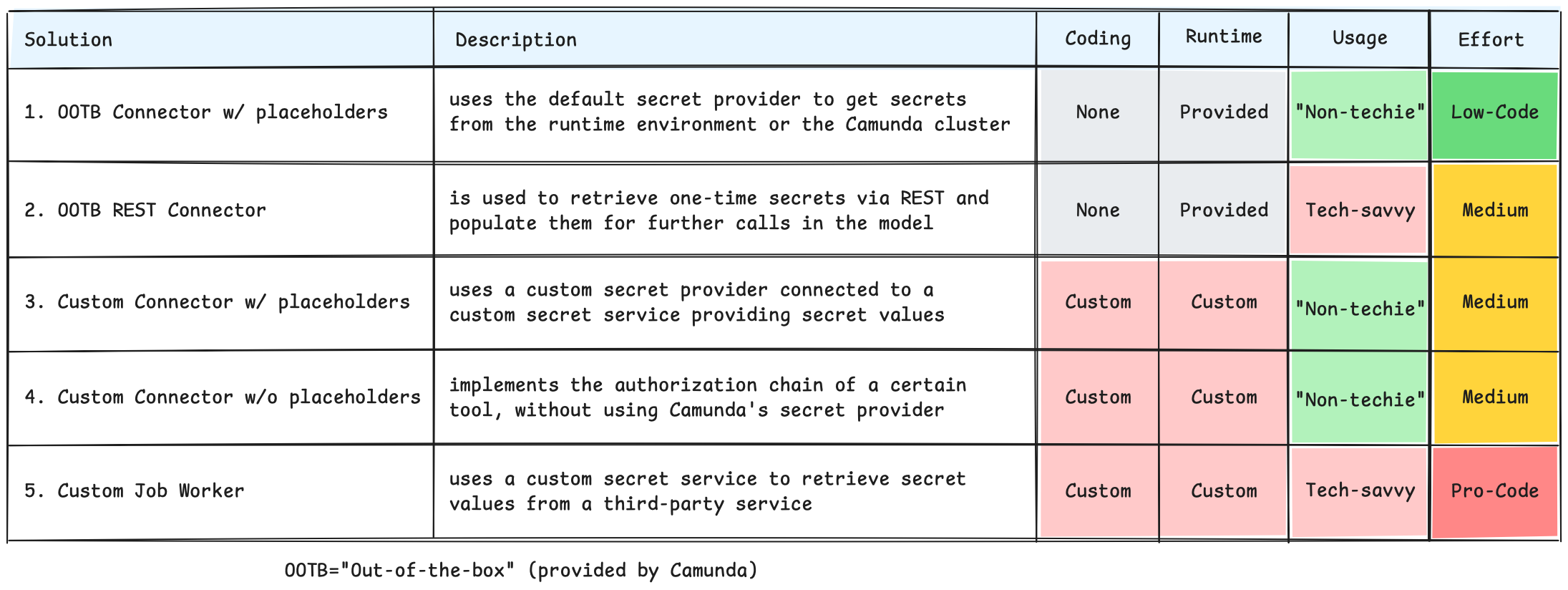
Secret handling in Camunda offers options from Low-Code to Pro-Code, each suited for different use cases and team expertise.
Low-Code solutions like connectors with placeholders and a default secret provider are simple, while custom secret providers or connectors offer more flexibility but require more effort. Pro-Code job workers give full control, enabling advanced integrations and secret management.
The right approach depends on your process complexity, system architecture, and security needs.
TL;DR: The Key Takeaways
Secure secret management: Properly managing secrets is essential for protecting sensitive data. This includes implementing encryption, access control, regular secret rotation, and centralized storage to safeguard credentials.
Retrieve secrets at app initialization or during runtime: Secrets can be accessed at application initialization (for static data) or dynamically during runtime (to ensure always up-to-date secrets).
Avoid storing secrets as process variables: Never store secrets in Camunda process variables, as they can leak into logs, backups, or other systems, potentially exposing sensitive information.
Use frameworks for secret management in job workers: For secure secret handling in Camunda job workers, leverage frameworks like Spring Cloud Vault or Kubernetes Secrets. Camunda does not offer native secret management for job workers, so external tools are necessary.
Camunda default secret provider for low-code solutions: Camunda’s default secret provider allows handling secrets in low-code connectors using placeholders within the connector configuration. Custom providers offer greater flexibility for third-party secret management and more complex use cases but introduce additional complexity.
Caching improves efficiency but adds complexity: Caching secrets can boost performance but requires careful consideration of security, consistency, scalability, fallback strategies, and auditability. Balancing these factors ensures secrets remain protected, up-to-date, and accessible while avoiding risks like unauthorized access or system failures.
Choosing the right secret management strategy: Select the best secret management approach based on your system architecture, application complexity, and your team’s experience to balance security, scalability, and ease of implementation.
Following these best practices will help you build a secure and flexible workflow application for your needs. If you have any questions on integrating secret management into your Camunda processes, don’t hesitate to reach out. I’m happy to help you ensure your workflows are both secure and efficient.
If you’re more into real-life examples, come check out my talk on this topic at CamundaCon 2025 on May 14th in Amsterdam! There are still tickets available.