
Running Process Segments In Camunda 8.8
Test Branches Without The Full Run


In Camunda 7, I used to test my processes end-to-end. Happy path plus all branches, but never the full process all the time. If I was changing one branch behind a gateway, I wanted to start close to that branch, run only what matters, and get feedback quickly.
In Camunda 8, testing often gets heavy fast. The moment you add connectors, documents, retries, and a few error paths, the simplest “run it end-to-end” test turns into a lot of setup. Camunda’s new process test library helped a lot, but until now it didn’t really give me that “run a segment” feeling out of the box.
That’s why I like what showed up in Camunda 8.8. Starting in the middle was already possible via start instructions in the REST API. With 8.8, you can also stop after a certain element via runtime instructions. Together, this makes process segment testing much more practical, without forcing you to drive the whole process on every test run.
What Segment Execution Means In Practice
When I say running process segments, I mean you execute a slice of a BPMN process:
You skip the normal start event and initial setup path.
You begin at a specific element that is relevant for the scenario you want to test.
You execute only the branch you care about.
You stop early when the segment goal is reached, instead of running the rest of the process.
The value is not theoretical. It shows up the first time you write a test for a certain error path behind a boundary event, or a compensation branch. If your test suite is slow and annoying, it gets fewer runs. If it is fast and focused, it gets run all the time. That’s the whole point here.
One important thing: segment execution is a testing tool, not an operations tool. In production you want processes to start where the model says they start, and you usually want full traceability of how data was produced. In tests, the tradeoff is different. In tests, you want to minimize setup and maximize signal.
What Changed In 8.8
Two ingredients matter here. One has been around for a while, and one is new in 8.8.
Start Instructions
It was already possible to pass start instructions when creating a process instance. In practice, this means you can bypass the normal start event and begin execution at a specific BPMN element.
This already helps with test setup. You can jump straight into a branch behind a gateway, or start right at a service task you want to exercise.
Runtime Instructions (since 8.8)
In Camunda 8.8 an alpha feature adds runtime instructions to the process instance creation call. At the moment it’s about terminating the instance.
On its own, terminate after is not that exciting. Combined with start before, it becomes a way to define a test segment:
Start at element X.
Let the process run until the branch reached your “assertion point”.
Configure termination so the instance stops and the test doesn’t keep driving the rest of the process.
This also fits the new client story. Camunda 8.8 introduces the new CamundaClient. The ZeebeClient is still there, but deprecated. And in 8.8, runtime instructions are not backported to the Zeebe client, so terminate-after is effectively new client only.
It also lines up nicely with testing tooling: the Camunda process test library already exposes the new CamundaClient, so segment-style tests are now easy to wire into what you probably already have.
How To Use It For Process Testing
I’ll keep the examples intentionally illustrative. The shapes and names may change while the feature is alpha, and I don’t want to invent request payloads. The workflow is the important part.
Fast Feedback For One Branch
Imagine a payment process with a gateway that splits into:
success: send confirmation
failure: escalate, create a ticket, wait for human
If you are working on the failure branch, an end-to-end test often wastes time getting you to the gateway and then exercising the success branch just because it exists.
With segment execution, a test can focus:
Start at the first element inside the failure branch.
Set only the variables needed for that segment.
Run until you have the evidence you care about (variables, incidents, job completions, reached element).
Terminate the instance to stop the test run.
Here is a snippet showing the idea using the new CreateProcessInstance command in the REST API. The important part is that you pass both start and runtime instructions with the initial create call:
{
  "processDefinitionId": "my-process",
  "processDefinitionVersion": -1,
  "variables": {},
  "tenantId": null,
  "operationReference": 0,
  "startInstructions": [{ "elementId": "UpdateSystemActivity" }],
  "runtimeInstructions": [{ "afterElementId": "InformCustActivity" }],
  "awaitCompletion": true,
  "fetchVariables": [],
  "requestTimeout": 0,
  "tags": ["process-tag"]
}
Notice what this does to test complexity. You don’t need:
To set up the success branch at all.
Test data for the earlier path.
To wait for the rest of the process.
That’s how you get more tests without making your suite slower.
Suggested Test Workflow And Guardrails
Segment execution gets dangerous if it becomes a shortcut to avoid thinking about the real process. The way to keep it useful is to treat it like a scalpel.
Here’s a workflow that tends to work:
Use segment tests for branch logic, error handling, and connector mappings.
Keep a smaller number of end-to-end tests for “the process still makes sense as a whole”.
Name your test start points intentionally. Pick stable elements like:
tasks right after a gateway
boundary event paths
compensation handlers
Make element IDs readable and consistent, because segment tests depend on them. I usually name them like:
CalculateInterestActivity
LoanApprovedXorSplit (and XorMerge)
LoanApprovedFlow
LoanRejectedFlow
Same for waiting elements and error paths:
WaitForCustomer1DayTimer
WaitForCustomerMessage
InterestRateTooLowErrorBoundary
Keep segment variables minimal. Only set what the segment needs.
Add one guard check per segment test that you are not cheating, for example:
validate required variables exist at start
validate the process reached the intended first element
This is what an actual test could look like. The process is completely fabricated and is only there to showcase the idea of having a complex process with many branches:
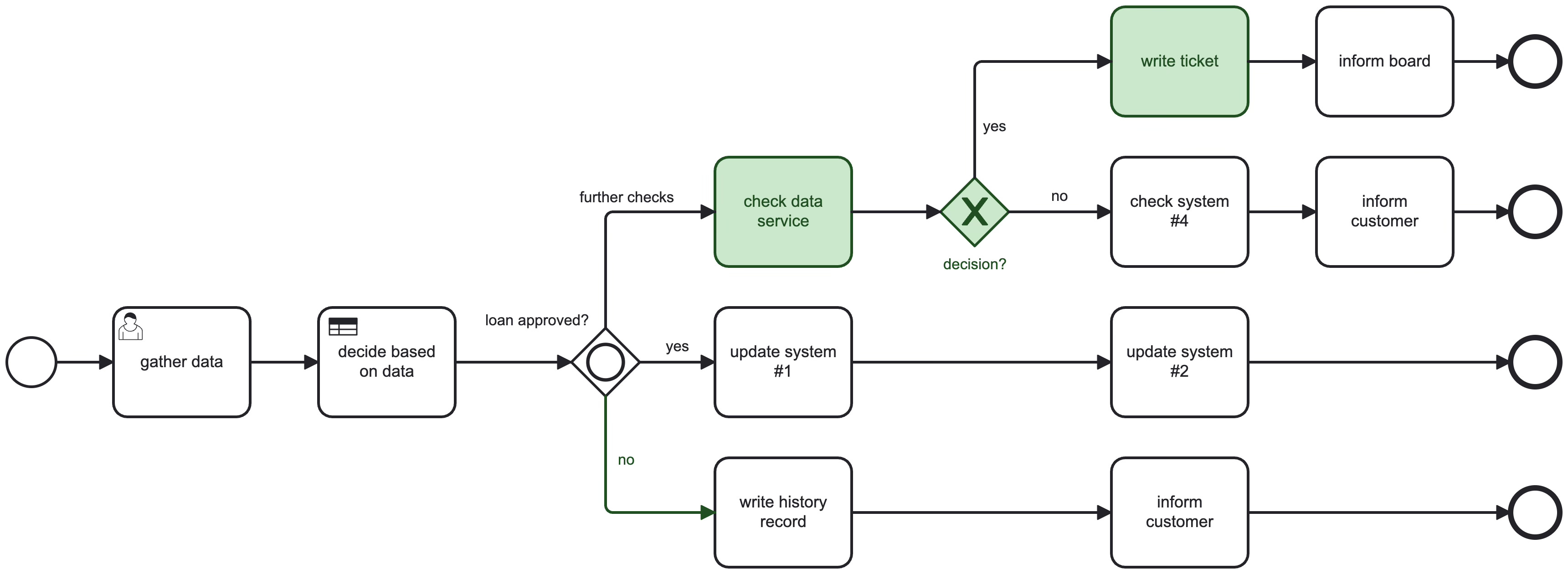
This is what the test class could look like, only testing segments in the process and ensuring that the workers are wired correctly. Therefore, I’m not mocking job workers. I want them to start and just mock the business logic behind them.
@SpringBootTest
@CamundaSpringProcessTest
class ProcessSegmentTest {

  @Autowired CamundaClient camundaClient;
  // only mock services here, I want workers to be started
  @Mock DataService dataServiceMock;
  @Mock TicketService ticketServiceMock;

  @Test void shouldRunSegmentAndSetTicketId() {
    // given
    when(dataServiceMock.checkData()).thenReturn(true);
    when(ticketServiceMock.writeTicket(anyString())).thenReturn(123456);

    // when
    final var processInstance = camundaClient
      .newCreateProcessInstanceCommand()
      .bpmnProcessId("my-process")
      .startBeforeElement("CheckDataActivity")
      .terminateAfterElement("WriteTicketActivity")
      .variables(Map.of("customer", 1221221))
      .send()
      .join();

    // wait for completion
    assertThat(processInstance).isCompleted();

    // then
    assertThat(processInstance).hasCompletedElementsInOrder(
        byId("CheckDataActivity"),
        byId("DecisionXorSplit"),
        byId("WriteTicketActivity")
       )
      .hasVariable("decision", true)
      .hasVariable("ticketId", 123456)
      .hasNoActiveIncidents();
  }
}
Here are also some tradeoffs to call out explicitly:
Starting in the middle can hide problems that happen earlier (mapping, correlation, data enrichment).
If you terminate too aggressively, you might miss cleanup behavior (compensation, final notifications).
Because runtime instructions are not final yet, treat these tests like they can break across upgrades and isolate them accordingly.
The goal is not segment tests everywhere. The goal is make the right tests easy. Many production incidents I’ve seen had a test suite story behind it:
The test was missing because it was too hard to write.
The test existed but was too slow, so it wasn’t run.
The test existed but didn’t cover the branch that failed.
Features like segment execution help because they reduce overhead. They turn “this is annoying” into “this is cheap”. Like already mentioned, I normally go for an expensive happy path end to end, and some cheap segments inside, to balance execution time against coverage.
Summary
Camunda 8 process segment execution is a testing capability that helps you exercise individual branches without running the full process every time. The building blocks are:
Start instructions to begin at a specific element.
Runtime instructions to stop the run once the segment did its job.
The new CamundaClient in v8.8 supporting the new API.
If you take one thing from this: don’t treat this as a production feature. Treat it as a way to make process testing cheaper and more focused, so your team actually writes and runs the tests.