
Validating Process Payloads With Camunda's Inbound Webhook Connector
A Practical Way to Keep Broken Payloads Out of Your Processes


In the previous article I talked about what Camunda’s webhook connector can do. This one looks at a very practical use case. We get data from other systems all the time and not all of it is good. Some payloads miss fields. Some are broken in creative ways. And if we let them start a process, we end up with errors halfway through the workflow.
The inbound connector lets us stop that early. The request comes in, we look at the payload and decide if it is good enough to start a process. If it is not, we return a clear response and we are done. No process created, no cleanup, no confusion later. It is a simple way to protect your workflow from bad input and keep things tidy.
The Problem with Bad Input
To show why validation matters, here is a small example. Imagine we get a request that is supposed to start an order process. The payload looks like this:
{
  "order_id": "A123",
  "customer": "Homer Simpson",
  "items": [...]
}
Now imagine the real process expects a field called total_amount. The caller forgot it. Maybe it was a mistake. Maybe their system only sends it sometimes. It happens.
If we let this payload start a process, everything looks fine at first. The process instance is created. Variables are set. The workflow moves on. Then a service task tries to read total_amount. Since the field is missing, the task fails. Camunda throws an exception and the process hits an incident.
This is the kind of mess you can avoid by validating the payload before the workflow begins. It saves time, keeps the process history clean and prevents these small mistakes from turning into broken instances.
Payload Validation With FEEL
We use the webhook connector for payload validation in one of our automations. The idea is simple: We expose a webhook that accepts a payload from a partner system. Before we start the actual business process, we check if the data is complete and valid.
We do this inside the webhook connector with the activation condition. As you remember, this condition decides if a process should start. It can e.g. check the payload for required fields. If something is missing, the webhook simply returns an error.
Here are some examples what we can do for validation in FEEL:
# check for string existence and content
field.id = null or is blank(field.id) or not(field.id instance of string)

# check for boolean
field.myBool = null or not(field.myBool instance of boolean)

# check number
field.myNumber = null or field.myNumber < 0

# packed into a list with names
rule_list: [
  { rule: “id-valid”, invalid: field.id = null or is blank(field.id) }
]
If we put these objects into a list, we can filter for invalid rules using FEEL, by adding a condition which selects all rules where invalid evaluates to true. Just add it in square brackets after the list variable:
# filter for invalid rules
rule_list[invalid=true]
To convert this into a boolean expression, we can compare the error count to 0. If count=0, we have no errors and can activate the webhook, if it is not 0, we don’t:
noErrors: count(rules[invalid=true])=0This results in this expression, which always evaluates to true or false:
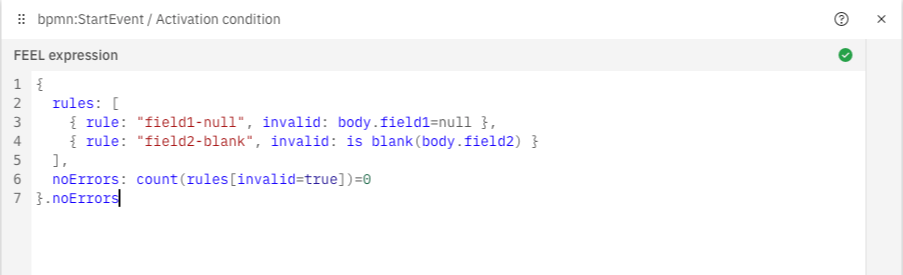
If the payload is valid, the process starts normally. The downside is that the caller always gets the same 422, so they never see what went wrong:
{
    body: { message: "Activation condition not met" },
    statusCode: 422
}
Alternative Implementation
Another possibility is to use the one time verification expression. Here, we can also add our rules, filter and count, but we can also add a custom body and status code:
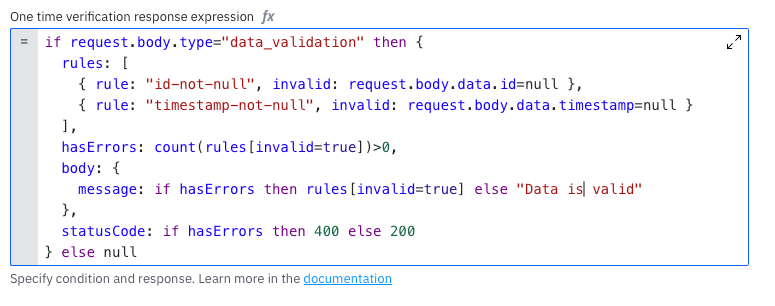
The response for an invalid request would look like this:
{
    body: {
        message: [
            { rule: "id-not-null", invalid: true }
        ]
    },
    statusCode: 400
}
You can make it look nicer if you want, as long as it is FEEL it works. The downside is, that you need to call the webhook twice. Once for the validation with a type, identifying it for the one time verification:
{
    body: {
        type: "data_validation", # trigger one time verification
        data: { ... }
    }
}
And once without the type, where the data is already validated:
{
    body: {
        # data only
        data: { ... }
    }
}
The caller checks the result of the first call. If the data is valid, they call the webhook again with the same payload but without the type field.
Summary
This article looked at a simple problem. We get payloads from other systems which might be invalid to our process. The inbound connector helps us avoid that. The request comes in, we check the data and only start a process when everything is in place.
The activation condition makes it easy to check fields and types or run a list of rules. If everything is valid, the process starts. If not, the caller gets a 422. The one time verification can return more detailed errors, but it requires the caller to make two requests.
Both options follow the same idea. Validate early, reject cleanly and keep your workflows tidy. It is a simple pattern that saves trouble later and keeps your history free from broken instances.